- Open a findingSelect its row on the Findings tab to open the detail panel.
- Fix it, then choose Mark reviewedRemove the link, replace it, or mark it nofollow, then mark it reviewed. The mark is saved to your account for that site.
- Run the next scan or let monitoring runEach reviewed link is checked again. We read the page it was on and, if the link is still there, look at where it leads.
What happens to a reviewed link
| What we find | It becomes | Why |
|---|---|---|
| The link is gone, or its page no longer exists | Resolved | There is nothing left to flag. |
| The link is still there but no longer flagged | No longer flagged | It is not counted as fixed, because you did not remove it. The note shows how it was flagged before and what the check found now. |
| The link is still there and still flagged | Still flagged | A marker such as nofollow stops it passing credit, but visitors can still reach it. The note says so. |
| We couldn’t read the page, or the other site wouldn’t answer | Reviewed | That tells us nothing, so it is tried again next time. |
| A resolved link shows up flagged again | Still flagged | It has come back. |
Up to 40 reviewed links are checked directly in one scan or monitoring check, and you can keep up to 300 marked for one site. These checks don’t use your link allowance.
The tiles at the top of the overview count what is open, waiting for a re-check, fixed and still flagged. The scan-complete email tells you how many were fixed.
You don’t have to wait for the next scan. Re-check on the report’s overview reads just those links straight away: see re-check the links you have fixed.
When to mark a finding reviewed
Mark a finding reviewed after you have dealt with it, not before. It is a note to yourself and a request to Link Signals: I’ve done something about this, please confirm. It is the right choice in all of these cases:
- You removed the link from the page.
- You replaced it with a link to a different, trustworthy site.
- You added a rel marker such as nofollow or sponsored, because you want to keep the link but not pass credit.
- You contacted the other site and it has fixed or moved the page.
If you have decided to keep a link exactly as it is, and don’t want it counted, there are two other choices. On a paid plan, trust it: the link is still read on every scan, and counted as safe while it is no more serious than now. On a monitored site, you can ignore it. A reviewed link, by contrast, still counts as open until a scan finds it gone or no longer flagged.
What “resolved” really means
A finding becomes resolved only when Link Signals has seen for itself that it is no longer a problem: the link has gone. If it is still there but no longer flagged, it is listed separately as no longer flagged and is not counted as fixed. Your mark alone never resolves a finding, so a report that says resolved is something you can rely on when you pass it to a client or a colleague.
A finding that stays flagged after you marked it reviewed is not an error. It means the link is still there and still leads somewhere flagged, and the note says what we saw. A marker such as nofollow stops a link passing ranking credit, but visitors can still click it.
Keeping track of your work
The reviewed marks are kept per site, so they are there the next time you open a report for that site, including reports from monitoring. The action plan counts what is open, waiting for a re-check, resolved and still flagged, which makes it a quick way to see how far through the list you are.
Questions
Can I undo a mark?
Yes. Open the finding and change its status. A link that comes back flagged after being resolved is reopened automatically.
Are reviewed links checked again automatically?
Yes. On the next scan or monitoring check of the site, each reviewed link is read again before it is called resolved.
Do I have to mark something before I can re-check it?
No. You can re-check every flagged link, or only the reviewed ones. See re-check the links you have fixed.
In your report
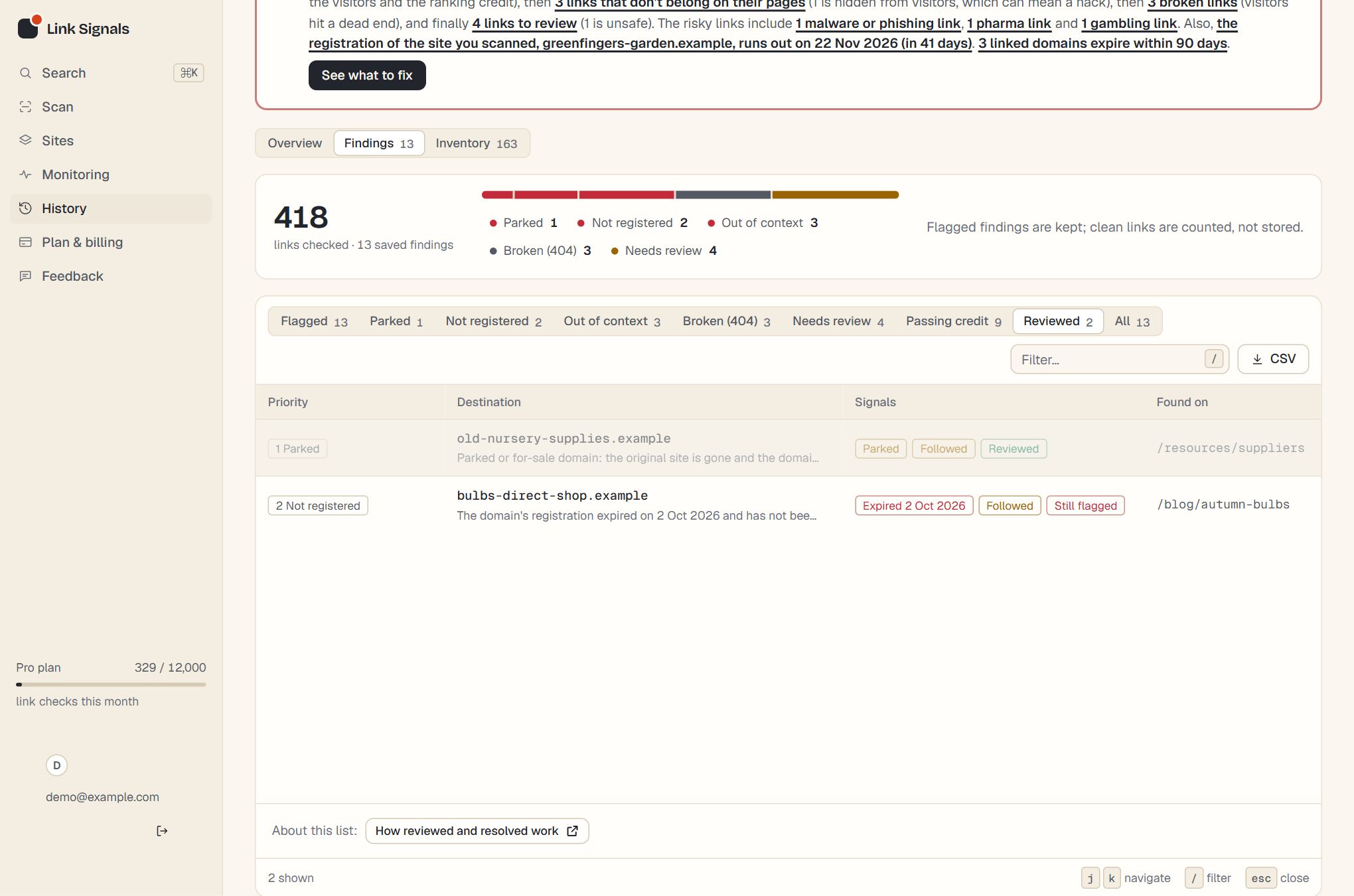
Reviewed links show up in three places in a report: the Reviewed tab and row chips in Findings, the Review status note in the detail panel, and the Fixed and No longer flagged lists on the Inventory tab. The tiles at the top of the Overview count them too.
| Tile | What it counts |
|---|---|
| Open findings | Every finding in this report that has not been fixed. It includes ones you have marked reviewed and ones still flagged after a check. |
| Waiting for a re-check | Findings you have marked reviewed that have not been checked again yet. |
| Fixed | Links that were read again and have gone from the page, or whose page has gone. |
| No longer flagged | Links still on the page that the latest check no longer flags. Not counted as fixed. |
| Still flagged | Reviewed links that were read again and are still a problem. |
In Findings
- A reviewed row is dimmed and carries a green Reviewed chip. A re-checked row carries a red Still flagged or a green Resolved chip.
- The Reviewed tab lists the links that are waiting or still flagged. It appears once there is something to show, and resolved links leave it.
- In the detail panel, the Review status section gives the date you marked it and what the last check found. The button changes with the state: Mark reviewed, Reviewed · undo, Mark reviewed again after a re-check, and a disabled Resolved.
The Resolved list on the Inventory tab
The panel “Fixed since you reviewed them” appears on the Inventory tab when at least one link has been resolved, with a green count. Each row gives the address, the note from the check, such as why it was resolved, and the date it was checked. It names the latest 20, newest first, and says “Showing the latest 20 of” the total when there are more.
Resolved links do not appear in the Reviewed tab. If a resolved link returns, it is opened again and flagged as before.
How this counts in your LinkSignal
Marking a finding as reviewed does not change your site’s external LinkSignal, because the score is worked out from what a scan records and a note to yourself is not a fix. The points come back when a later scan finds the link gone or no longer flagged. The LinkSignal overview explains every row, and how the score is worked out gives the rules. LinkSignal is Link Signals’ own metric, worked out only from what this tool finds, and it is not connected to any search engine or third-party score.
Scan your site, work through the action plan, and let the next scan confirm it.
