Every finding in a report belongs to one of five priorities, and the order is the order to work in. The report, the overview, the headline and the scan email all use the same five, so the number you see in one place is the number in the others.
The five priorities
| Priority | What it is | Why it comes here |
|---|---|---|
| 1 Parked | The domain is for sale and the site you linked to has gone. | Visitors who click land on an advert, and the link still passes your ranking credit. |
| 2 Not registered | Nobody holds the domain, or its registration has expired. | Anyone can register it and receive your visitors. People look for exactly these. |
| 3 Out of context | Hidden from visitors, shown only to search engines, written by encoded script, or nothing to do with the page it sits on. | The usual sign of injected spam or a compromised page. |
| 4 Broken (404) | The page is gone. | A dead end for visitors, and a domain that has gone can be taken over later. |
| 5 Needs review | Anything else flagged as risky or unsafe, unsafe first. | These need a person’s decision. |
One finding, one priority
A link that is parked and also hidden is counted once, under the first of these that applies. That is why the tabs add up to the flagged total, and why the numbers in the headline, the cards and the email always agree.
Why Needs review is always last
It catches whatever is flagged but isn’t one of the other four. If it came earlier it would take their findings, so it stays last, even if you change the order.
The overview
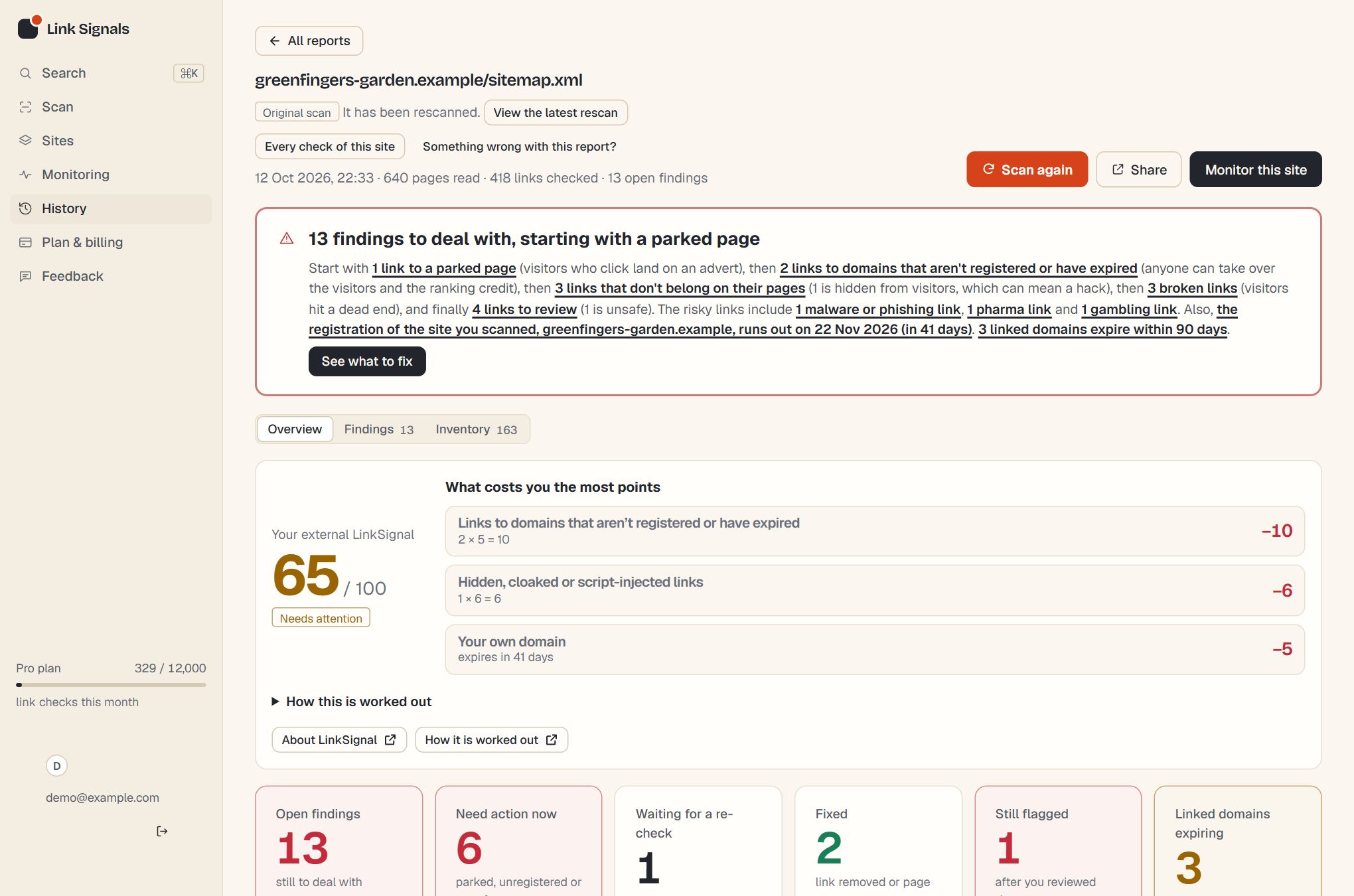
The overview opens with an action plan: a short paragraph that takes the three most urgent priorities with findings and says what to do about each. Under it is a card for each part of the scan, most urgent first, with its numbers, the action, and a button to the findings behind it.
| Card | What it adds |
|---|---|
| Out of context links | Also shows Passing ranking credit: how many of them carry no nofollow, sponsored or ugc marker, so they still pass your credit. |
| Broken links (404) | Also counts server errors, which have their own list. Sites that couldn’t be reached or read are counted in the inventory, not given a number here, because they don’t say whether a link is wrong. |
| Your site | When your domain and certificate run out, and how your site serves HTTPS. |
What the links are about
Priorities say what to do first. A second set of cards says what the risky links are about: malware and phishing, adult content, pharma, illegal drugs, gambling, payday loans and so on. Each kind that was found gets a card with its counts (how many are on a blocklist, off-topic for their page or hidden) and a button to those links, most serious first. They add detail to the priorities and don’t change them.
A worked example
A scan flags nine links. Two point to a domain that now shows a for-sale page, one points to an expired domain, three are hidden links to pharmacy sites, two return 404 and one is an unrelated link to a gambling site that is not hidden. The tabs read: Parked 2, Not registered 1, Out of context 4, Broken 2, Needs review 0. The gambling link counts as out of context, because it is unrelated to its page, so it is not left in Needs review. The headline names the parked links first, and the action plan paragraph covers the three most urgent priorities that have findings.
If you switch the order on a paid plan so that Out of context comes first, the same nine findings are shown, the tabs add up to nine as before, and only the sequence changes.
How priorities relate to verdicts
A verdict describes a link, such as Not safe or Broken. A priority groups findings into piles you can work through. Several verdicts can sit in one priority: a Not safe link and a Needs review link that are both unrelated to their page are both out of context. See verdicts explained for the full list.
Changing the order
Paid plans can put the first four in their own order, saved to the account. The report, the overview and the scan email then follow it. See set the order Link Signals ranks findings.
Questions
Why is a parked domain above one that isn’t registered?
A parked domain is something that has already happened: the site you linked to is gone and visitors land on an advert. A domain that isn’t registered is a risk that hasn’t happened yet. If you’d rather see it the other way round, paid plans can change the order.
Where do server errors and sites that refused us go?
They have no priority, because they say nothing about whether a link is wrong. They are counted on the Broken links card and listed as other findings in your email.
Can I hide a priority I don’t care about?
No. Priorities set the order and never what is shown, so every finding is always listed. You can mark findings reviewed to track your progress, or ignore them in monitoring.
Is the priority a score?
No. It is a category, so you can see why a finding is where it is. There is no number to argue with.
In your report
The five priorities appear in the report in three places, and all of them use the same counts.
| Where | What it shows |
|---|---|
| Overview cards | One card for each priority that has findings, with a chip reading Priority 1 to Priority 5. The number is the priority’s place in your order, so a custom order renumbers the chips. Priorities 1 to 3 are red and 4 and 5 are amber. |
| Findings tabs | After Flagged come the five priorities in your order, each with its count, then Passing credit, Reviewed (once you have reviewed something) and All. A finding sits in one priority tab only. |
| Priority column | Each row’s chip, such as 2 Not registered, and the bar and legend above the table, coloured by priority. |
The order of the cards
Cards are sorted most urgent first: Priority 1 to 5, then Act soon, then Worth a look. The subject cards are shown in their own block after those, ordered High risk, Medium risk, Lower risk.
| Chip | Colour | Used for |
|---|---|---|
| Priority 1 to 3 | Red | Parked, not registered and out of context, in the default order. |
| Priority 4 and 5 | Amber | Broken links and Needs review, in the default order. |
| High risk, Medium risk, Lower risk | Red, amber, grey | The subject cards under “What the risky links are about”: malware, adult content, pharma and illegal drugs are High risk; gambling, payday loans, violence and hate are Medium; other risky content is Lower. |
| Act soon | Amber | Your own site’s domain, certificate or HTTPS, and the action plan when a reviewed link is still flagged. |
| Worth a look | Grey | A heads-up that is not a finding, such as domains about to expire, ranking credit or plain HTTP links. |
| No action | Green | Nothing found. These do not get a card: they are listed in one line under the cards. |
The subject cards sit in their own block, after the others, under the heading “What the risky links are about”. They count the same findings as the priority cards by subject, so they are not added to the priority counts or to the action plan paragraph.
The numbers at the top
- Open findings counts every finding in the report that has not been resolved. That includes ones you have marked reviewed and ones still flagged after a check, so it is the same number as the headline, the Findings tab and the figure at the top of the report. Waiting for a re-check and Still flagged are parts of it, and Resolved is counted separately because those links have left the report.
- Need action now counts parked, not registered and out of context findings together, whatever order you have chosen.
- The action plan paragraph takes the three most urgent priorities that have findings, in your order, and says what to do about each.
The priority a finding belongs to is the first one in your order that it matches. Moving a priority earlier can move findings into it from a later one, which is why the counts shift when the order changes but the total does not.
How this counts in your LinkSignal
The same findings feed your site’s external LinkSignal: hidden, cloaked and script-injected links and out of context links come from the out of context priority, and the other priorities map to links to unregistered or expired domains, links to parked pages, broken links and links that need review. The score always uses the default order, so changing your own priority order never changes it. Points and limits are in how the score is worked out, and the LinkSignal overview explains each row. LinkSignal is Link Signals’ own metric, worked out only from what this tool finds, and it is not connected to any search engine or third-party score.
Run a scan and the report puts your findings in order.
