Each finding is counted once, in the first of these it matches. The standard order is:
| Priority | What it is | Why it ranks here |
|---|---|---|
| 1 Parked | The domain is for sale and the site you linked to is gone. | The link now sends visitors to an advert. |
| 2 Not registered | Nobody holds the domain, or its registration has expired. | Anyone can register it and receive your visitors. |
| 3 Out of context | Hidden from visitors, shown only to search engines, or nothing to do with the page it is on. | The usual sign of injected spam. |
| 4 Broken (404) | The page returns 404 or is gone. | A dead end for visitors. |
| 5 Needs review | Anything else flagged as risky or unsafe. | It needs a human decision. |
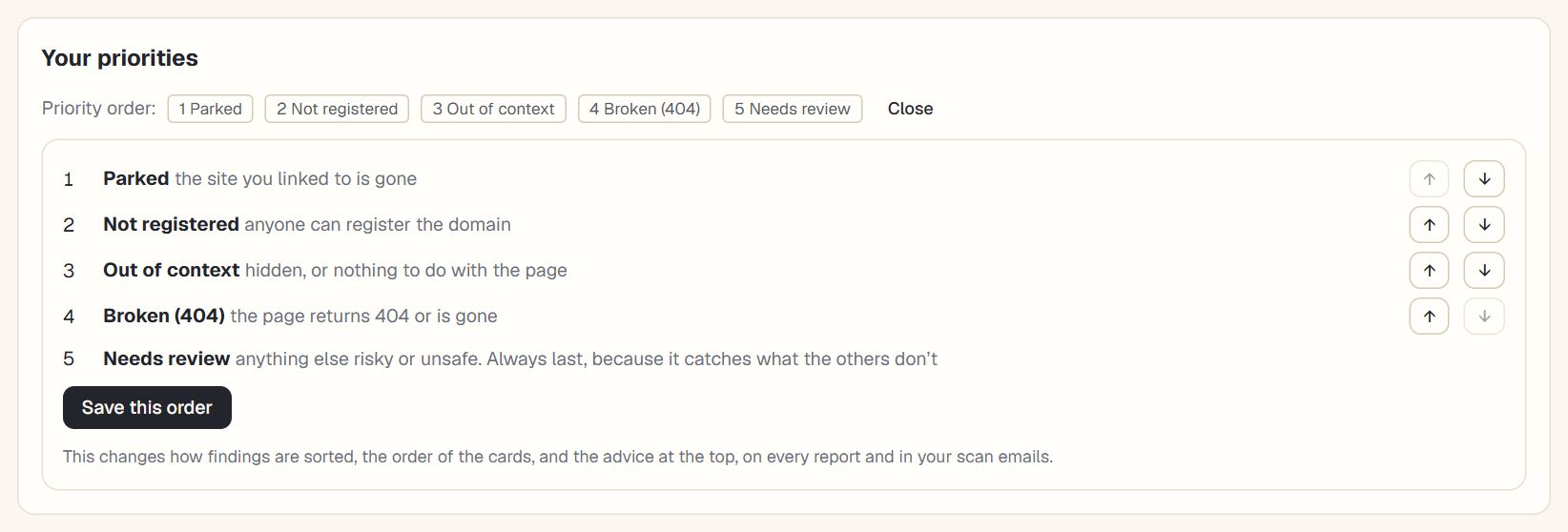
The order sorts the findings table, orders the cards on the overview, decides what the paragraph at the top of the report leads with, and decides which finding the scan-complete email leads with.
Change the order
- Open a reportChoose a scan in History. On the Overview tab, under the paragraph, you’ll see the current order.
- Select Change the orderUse the arrows to move a priority up or down.
- SaveThe new order applies to every report and email on your account. Back to the standard order undoes it.
| Plan | Priority order |
|---|---|
| Free | The standard order. |
| Paid plans | Your own order, saved to your account. |
Why the standard order is what it is
The standard order puts the problems that cost you most, and can be fixed fastest, first. A parked destination is already sending your visitors to an advert. A domain nobody holds could be registered by anyone, so it is the most likely to be used against you. Out-of-context links point to injected spam. Broken pages hurt visitors but not much else, and everything else needs a human decision.
When to change it
The standard order suits most sites, but your situation may call for something different:
- A site that has just been hacked. Put out of context first, because injected spam is the whole problem.
- A large, old content site. Broken links may be the volume problem, and moving them up makes the clean-up list more manageable.
- An agency with several clients. Choose the order that matches how you report, so the scan emails and the report read the same way.
What the order changes, and what it doesn’t
The order changes how findings are sorted, the order of the cards on the overview, which finding the paragraph at the top and the scan-complete email lead with, and the order of the action plan. It does not add, remove or hide anything. Every finding is in the report whatever the order, and the counts are the same.
The order is saved to your account and applies to every site you scan. Shared reports use the owner’s order, so the person you share with sees what you do.
Questions
Is this available on the free plan?
The free plan uses the standard order. Choosing your own is part of the paid plans.
Why can’t I move Needs review?
It catches everything flagged that the other four priorities don’t. If it came earlier it would take their findings, so it always stays last.
Does the order change what is counted as a problem?
No. It only changes the order things are shown and written about. The checks themselves are the same.
How this counts in your LinkSignal
Your priority order changes how findings are sorted and which are put first in the action plan. It does not change your site’s external LinkSignal, which always uses the default order so the same scan gives the same score to everyone looking at it. See the LinkSignal overview for the rows and how the score is worked out for the rules. LinkSignal is Link Signals’ own metric, worked out only from what this tool finds, and it is not connected to any search engine or third-party score.
Pick a plan and put the priorities in the order that fits your site.
